One of the most important things you can do is backup your infrastructure servers. Obviously DHCP is a critical service without it many devices cease to function on a reboot. We have DHCP servers with multiple scopes defined to take care of different subnets on the network for IP [phones, wireless AP and clients and there can be a significant amount of configuaration and documentation required to restore that service when it is lost. In a crisis it is most important to get that service up and running as soon as possible without trying to restore the entire server from a backup.
DHCP is the lifeblood of a large network so backing it up should be important and not left to the simple backup of the domain controller. It is rather simple to backup from the management console by right clicking and choosing backup but this is far from automated and you still need to copy the file off the server to make it useful. There is a command line that can be used to complete this same task and even save the file to another server using the UNC path.

The best thing is to automate this process so I recommend using the Scheduled Task component under Group policy Preferences and applying it the OU your DHCP servers are in., within my environment that is the Domain Controllers OU.
The policy is rather simple:
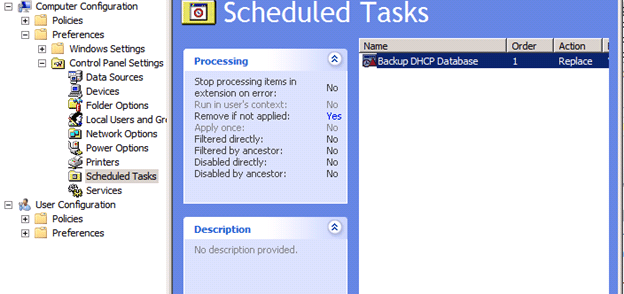
A scheduled task under the Computer Configuration section
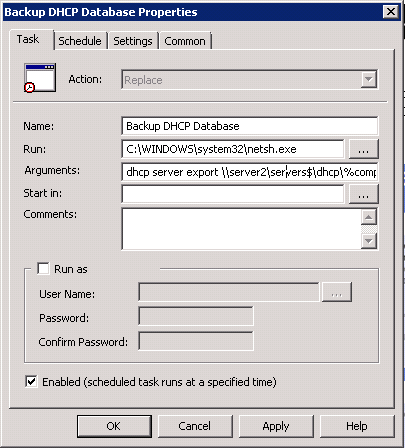
And schedule it to run daily be sure to add the domain computers group to have full controller over the share you are asking them to backup the file to. Since we didn’t specify a credential in the RUN AS section (there is good reason not to, the password is stored in Active Directory and can be read)
Leave a Reply