As part of my recent Sharepoint work I worked on finding a good Weather webpart the best that I could find was the following from http://blogs.msdn.com/ketaanhs/archive/2008/03/22/showing-weather-web-part-using-rss-weather-yahoo-com-in-sharepoint-2007.aspx
The RSS feed I used was:
And used the following XSL Spreadsheet:
<?xml version=”1.0″ encoding=”ISO-8859-1″?>
<xsl:stylesheet version=”1.0″
xmlns:xsl=”http://www.w3.org/1999/XSL/Transform” xmlns:yweather=”http://xml.weather.yahoo.com/ns/rss/1.0” xmlns:geo=”http://www.w3.org/2003/01/geo/wgs84_pos#”>
<xsl:output method=”html” indent=”yes”/><xsl:template match=”/”>
<xsl:variable name=”scale”>
<xsl:value-of select=”rss/channel/yweather:units/@temperature”/>
</xsl:variable><table width=”100%” border=”0″ cellspacing=”0″ cellpadding=”3″ class=”Normal”>
<tr bgcolor=”#075C70″>
<td colspan=”2″><strong><font color=”white”>Weather Report – <xsl:value-of select=”rss/channel/item/title”/></font></strong></td>
</tr>
<tr>
<td><strong><font size=”4″><xsl:value-of select=”rss/channel/item/yweather:condition/@temp”/><xsl:text>°</xsl:text><xsl:copy-of select=”$scale” /></font></strong><br/>
High <xsl:value-of select=”rss/channel/item/yweather:forecast/@high”/> <xsl:text>°</xsl:text><xsl:copy-of select=”$scale” /> <br/>
Low <xsl:value-of select=”rss/channel/item/yweather:forecast/@low”/> <xsl:text>°</xsl:text><xsl:copy-of select=”$scale” /> </td>
<td>
<xsl:text disable-output-escaping=”yes”><img src=”http://us.i1.yimg.com/us.yimg.com/i/us/we/52/</xsl:text>
<xsl:value-of select=”rss/channel/item/yweather:condition/@code”/>
<xsl:text disable-output-escaping=”yes”>.gif”/></xsl:text>
<br/>
<xsl:value-of select=”rss/channel/item/yweather:condition/@text”/></td>
</tr>
<tr bgcolor=”#075C70″>
<td colspan=”2″><strong><font color=”white”>2 Day Forecast</font></strong></td>
</tr>
<tr>
<td colspan=”2″><table width=”100%” border=”0″ cellspacing=”0″ cellpadding=”3″ class=”Normal”>
<xsl:for-each select=”(rss/channel/item/yweather:forecast)[position() < 3]”>
<tr>
<td><xsl:value-of select=”@day”/></td>
<td>
<xsl:text disable-output-escaping=”yes”><img src=”http://us.i1.yimg.com/us.yimg.com/i/us/we/52/</xsl:text>
<xsl:value-of select=”@code”/>
<xsl:text disable-output-escaping=”yes”>.gif”/></xsl:text>
</td>
<td><xsl:value-of select=”@text”/><br/>High: <xsl:value-of select=”@high”/>
<xsl:text>°</xsl:text><xsl:copy-of select=”$scale” />
Low: <xsl:value-of select=”@low”/><xsl:text>°</xsl:text><xsl:copy-of select=”$scale” />
</td>
</tr>
</xsl:for-each>
</table></td>
</tr></table>
</xsl:template>
</xsl:stylesheet>
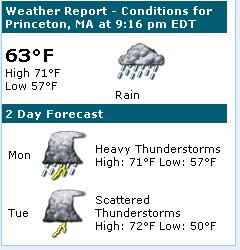
And you end up with this:
The webpart text is in PDF here:Weather from Yahoo – Notepad


Leave a Reply